

Google folds AI search into a report you already have, and says so plainly. From the AI features documentation, last updated December 10, 2025:
Sites appearing in AI features (such as AI Overviews and AI Mode) are included in the overall search traffic in Search Console.
That single sentence is the reason most AI traffic dashboards are wrong. The AI Overviews impression and the ordinary blue-link impression land in the same row of the same Performance report, under the same Web search type, with no column for which branch of a 70-location HVAC group the answer actually named.
The rest of the surfaces report somewhere else. Bing Webmaster Tools opened an AI Performance public preview on February 10, 2026 with cited pages and grounding query phrases. Google Analytics sees referral sessions, but only after a click. Server logs see crawlers, which are not customers. Nothing joins them.
So the question worth asking is narrower than "how much AI traffic did we get?" It is: which answer named which branch, which page or profile supported it, which customer clicked, and whether the lead reached the right location.
Important
Treat AI search measurement as four decision signals: visibility, citations, referral traffic, and booked demand. Use crawler logs and prompt samples as diagnostics. If everything is blended into one number, operators cannot tell what to fix.
Start with a measurement stack, not one report
AI search measurement needs a stack because each source answers a different question.
- Search visibility tells you whether Google or Bing surfaced the site in AI-powered search experiences.
- Citation and source data tells you which URLs, profiles, directories, or articles supported an answer.
- Referral traffic tells you whether a user clicked from ChatGPT, Perplexity, Gemini, Google, Bing, or another AI surface.
- Booked demand tells you whether the right call, form, booking, or job reached the right branch.
- Crawler and fetcher logs are diagnostics. They tell you whether AI systems could access the public page when they tried.
- Prompt samples are diagnostics too. They show how a market and service answer behaved in a controlled check.
Those signals should live next to the same operating fields: market, location, service line, expected branch, landing page, answer text, source URL, lead path, and owner. How to audit AI search visibility across locations covers the broader audit cadence. This article focuses on the tracking layer behind that cadence.
For the operating record behind those prompts, providers, citations, competitors, and markets, see how to track AI search across providers and local markets.
A single AI number hides the engine split
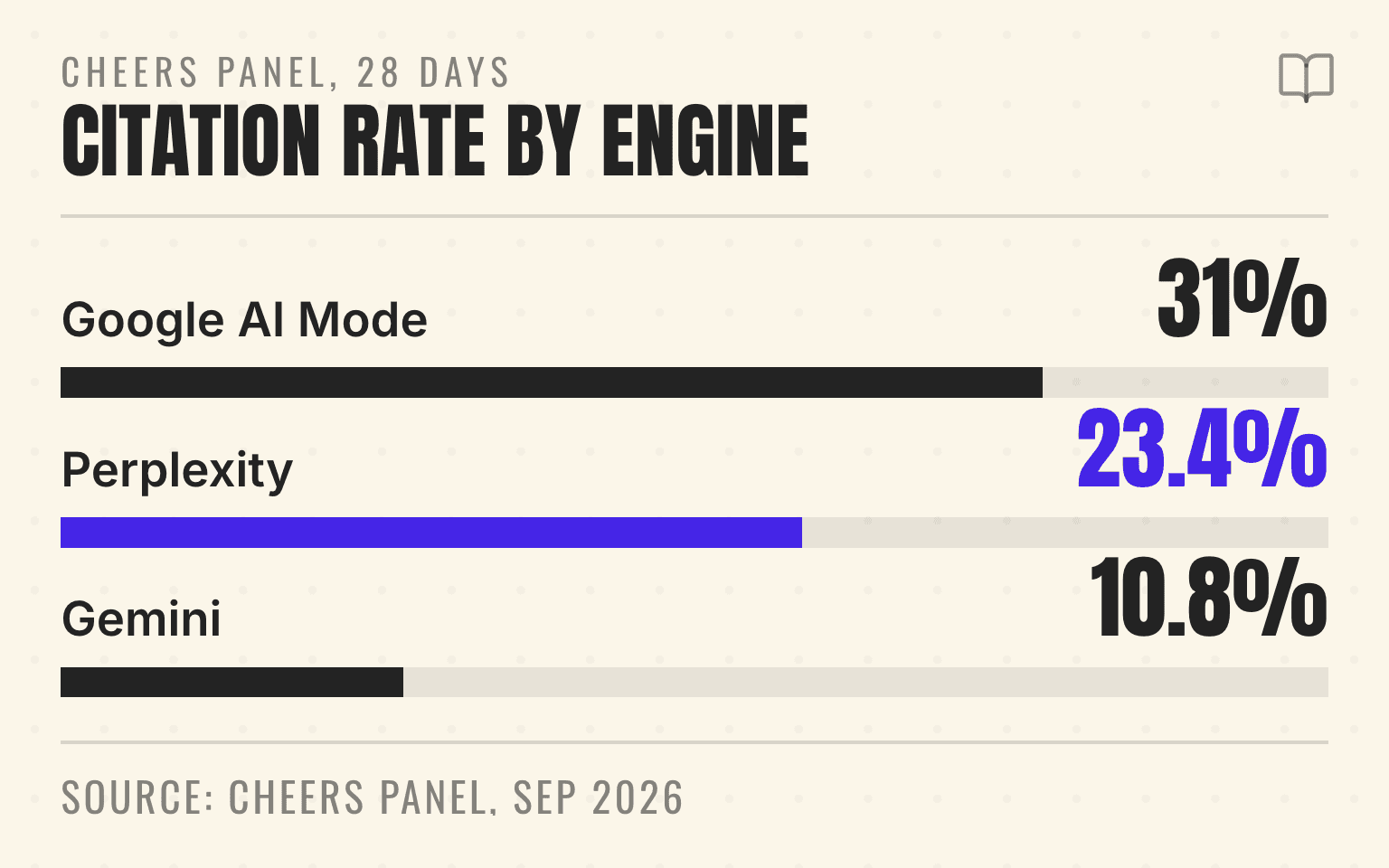
We can show what blending costs, because we run the same prompt set against four engines for the same companies. In the Cheers panel of 13 home-services companies over the 28 days ending September 2, 2026, leaving out questions that name the company itself, the mean company appearance rate was 32.8% on Google AI Mode, 27.3% on ChatGPT, 23.7% on Gemini, and 16.2% on Perplexity. Citation rate put the engines in a different order. It ran from 10.8% on Gemini and 11.5% on ChatGPT to 23.4% on Perplexity and 31.0% on Google AI Mode, a spread of nearly three to one on the same companies in the same window.
Cheers panel, 28 days
One number hides four answers
13
Companies
Mean company citation rate by engine, Cheers panel, 28 days ending September 2, 2026
Appearance rate 32.8%
Appearance rate 16.2%
Appearance rate 27.3%
Appearance rate 23.7%
Cheers panel, 28 days ending September 2, 2026, 13 home-services companies, non-branded prompts, aggregate only (corrected September 28, 2026). Mean company citation rate; appearance rate in each note. Methodology at cheers.tech/research/methodology.
| Engine | Mean citation rate |
|---|---|
| Google AI Mode | 31% (Appearance rate 32.8%) |
| Perplexity | 23.4% (Appearance rate 16.2%) |
| ChatGPT | 11.5% (Appearance rate 27.3%) |
| Gemini | 10.8% (Appearance rate 23.7%) |
Perplexity names the fewest businesses but cites them more often than it names them. ChatGPT and Gemini name more businesses and link to far fewer of them. Those are different operating problems with different owners, and a single blended AI number erases the difference. The engine and prompt-shape cuts are in the home services AI visibility index, with the appearance and citation formulas in the research methodology.
For a roofing brand, that means the Tampa roof repair answer should not be combined with a Houston roof replacement answer. For a med spa group, a Botox query in Columbus should not be mixed with a laser hair removal query in Scottsdale. The visibility report may be brand-level. The fix is usually location-level.
What Google Search Console can and cannot tell you
Google's AI features guidance says appearances in AI Overviews and AI Mode are included in Search Console's overall Search traffic, inside the Performance report under the Web search type. Google also says AI Mode and AI Overviews may use query fan-out, so the response and supporting links can vary across related searches.
That matters because Search Console is useful, but it is not a branch-level lead ledger. It can show pages, queries, clicks, impressions, countries, devices, and the normal performance dimensions. It does not tell a franchise operator that "the Mesa emergency AC answer cited the Phoenix East branch page, then the buyer called the Gilbert phone number."
Google's dedicated Search Generative AI performance reports are now available to all websites worldwide. Google's August 31, 2026 update to the launch post says so, and the Search report lists impressions by page, country, device, and date for AI Overviews and AI Mode. If the report does not appear for a property, Google's help page says the site may not have enough generative AI impressions or may be excluded from those features. The report measures impressions, not local leads, so the operator caveat still holds: Search Console can identify pages, queries, and countries, but it does not prove which branch won a booked job.
That is useful news for operators, but the practical rule stays the same. Use Search Console to find the page and query family. Then use location-level prompt checks, source checks, analytics, and call tracking to figure out whether the right branch won the answer. When campaign numbers and public branch numbers differ, follow the call tracking standard for AI search before trusting the attribution.
Use Bing's AI Performance data as a citation lens
Bing Webmaster Tools gives a cleaner citation-specific view than most operators had a year ago. Its AI Performance public preview, announced February 10, 2026, reports AI-driven impressions, total citations, average cited pages per AI answer, cited pages from the site, visibility trends, and grounding query phrases. Microsoft is careful about interpretation. The announcement says of the per-URL citation count:
This reflects how often pages are cited, not page importance, ranking, or placement.
For a local service brand, that distinction matters. A high-citation corporate guide can be a content win, while a missing location page can still be a lead problem. If Bing cites the brand's generic "roof repair" page but never cites the Tampa page, the reporting action is not "write more about roofing." The action is to inspect whether the Tampa page has service coverage, local proof, reviews, photos, phone routing, and structured facts that agree.
What query fan-out means in Google AI Mode explains why one local question can turn into several source jobs. Bing's grounding-query and cited-page reports give another way to see that source behavior.
GA4 sees the click, not the answer
Google Analytics is still part of the stack because it measures the session after a click reaches the site. GA4 traffic-source dimensions include source, medium, campaign, and referrer context. That makes it useful for isolating referral sessions from domains such as chatgpt.com, perplexity.ai, claude.ai, gemini.google.com, copilot.microsoft.com, and other AI surfaces when they pass referrer data.
But GA4 should not be treated as the AI visibility report. AI answers can mention a brand without sending a click. A user can read an answer, search the brand name later, call from a Business Profile, or book through a third-party listing. Some referrals may arrive as direct traffic when no referrer information is available. Google also notes that most Google searches happen over HTTPS, which affects keyword visibility.
Use GA4 for what it is good at: sessions, landing pages, events, conversions, path quality, and assisted demand after a user reaches the site. Pair it with Search Console and Bing Webmaster Tools for search visibility, and with server logs for crawler access.
For a restoration roll-up, a useful GA4 segment is not "AI traffic." It is "AI referrals landing on water-damage pages in markets where we can serve after-hours calls." That segment can then be compared with phone calls, form starts, appointment submissions, and booked jobs by branch.
Business Profile actions belong beside that readout, not inside the AI-referral total. Which Google Business Profile performance metrics matter across locations? explains how to separate views, website clicks, call clicks, direction requests, and downstream outcomes before comparing branches.
Paid ChatGPT placements need another line in the stack. The multi-location ChatGPT Ads test plan separates sponsored impressions, clicks, leads, and jobs from organic answers, citations, and referral traffic.
Next step
Is AI recommending your business?
Find out how visible you are across ChatGPT, Gemini, Perplexity, and AI Overviews.
Logs show access, not demand
Crawler and fetcher logs are often misunderstood. They are important because AI systems cannot cite or fetch content they cannot reach. They are weak as demand signals because most bot requests are not customers.
OpenAI separates OAI-SearchBot, GPTBot, and ChatGPT-User. OAI-SearchBot is used to surface websites in ChatGPT's search features. GPTBot is for training-related crawling. On the third, OpenAI's crawler documentation is explicit:
ChatGPT-User is not used to determine whether content may appear in Search.
Anthropic separates ClaudeBot, Claude-User, and Claude-SearchBot. Perplexity's documentation draws the same line, describing PerplexityBot as designed to surface and link websites in search results on Perplexity, and Perplexity-User as the agent that supports user actions inside the product.
That separation should shape the report. A blocked OAI-SearchBot, Claude-SearchBot, or PerplexityBot request can explain why a source may be unavailable. A spike in ChatGPT-User or Perplexity-User can suggest user-triggered access. Neither is the same thing as a qualified lead.
For more crawler policy detail, pair this article with Which AI crawlers should local businesses allow?.
Tie every AI signal back to a location
The reporting unit should be the local buying moment. That usually means one query, one market, one service, one expected branch, and one source path.
An HVAC group can track "emergency AC repair in Mesa" against the Phoenix East branch. A garage door franchise can track "garage door spring repair in Plano" against the right franchisee. A med spa group can track "laser hair removal near Short North" against the Columbus studio. A hospitality group can track "best hotel for a family near the airport" against the property page, reviews, and booking path.
Each row should answer: did the AI answer mention the brand, did it name the right location, what source did it cite, did a user click, did the session convert, did the call route correctly, and who owns the next fix?
A useful first row can stay plain: source, Bing AI Performance; query, emergency roof repair in Tampa; expected location, Tampa branch; cited URL, the Tampa roof repair page; referrer session, none this week; bot signal, search crawlers reached the page; conversion path, Tampa phone line; owner, location-page lead; next action, add branch proof and retest.
What is a good AI visibility score for a local business? is useful once the team has those rows. A score is only helpful when it points to the source, location, or service gap behind the number. When the source field is the mystery, use how to find which websites AI search uses as sources in your industry to classify the cited URLs before assigning the fix.
Do not over-read small samples
AI search results can vary by user, geography, freshness, model behavior, query wording, and retrieval path. A single prompt test is a snapshot, not a ranking report.
That does not make measurement useless. It means the sample needs repeatability. Use the same query set, same target markets, same engines, same date range, and the same inclusion rules each month. Record whether the answer mentioned the brand, whether the source was owned or third-party, whether the location was correct, and whether the lead path was usable.
The safe language is "appeared in this sample," "was cited in this date range," or "sent referral sessions in this period." Avoid saying an AI engine "trusts" a source unless the methodology actually supports that claim.
First 30 days: build a local AI traffic readout
Start with the locations and services where one more booked job changes the month.
- Pick 10 to 25 priority query and market combinations across high-value services.
- Pull Search Console Web performance data, dedicated Search Generative AI reports, Bing AI Performance data, GA4 AI referral sessions, server logs for AI bots, and call or form conversion events.
- Create one row per query, market, expected branch, cited source, landing page, AI referral, conversion path, and owner.
- Mark each row as visibility gap, source gap, tracking gap, routing gap, or conversion gap.
- Review the rows monthly with marketing, ops, listings, and the location owner.
The goal is not to make the report larger. The goal is to make it assignable. If Google sees the page but the AI answer cites a directory, marketing and listings inspect the source gap. If ChatGPT-User reaches the page but no user clicks appear, treat it as access context, not traffic. If AI referrals land on the right page but calls route to the wrong branch, ops owns the fix.
For most multi-location brands, the first useful report fits on one page. It says which local answers are visible, which sources support them, which pages or profiles need work, and which locations should be checked again next month.
If your team needs that report connected to location pages, reviews, listings, and booked demand, the AI visibility platform page shows how the prompt, source, and location fields join up. Bring the markets and services you care about most.
For Google discovery of your social and video accounts, use Search Console platform properties. Keep those account reports separate from native-platform reach and AI-answer measurement.
Sources
Checked September 2, 2026.
- AI features and your website. Google Search Central, last updated December 10, 2025. developers.google.com/search/docs/appearance/ai-features. Source of the quoted Search Console sentence and of the query fan-out description.
- Introducing Search Generative AI performance reports in Search Console. Google Search Central Blog, June 2026, updated August 31, 2026 with worldwide availability. developers.google.com/search/blog/2026/06/gen-ai-performance-reports. Source of the dedicated AI Overview and AI Mode report scope.
- Introducing AI Performance in Bing Webmaster Tools Public Preview. Bing Webmaster Blog, February 10, 2026. blogs.bing.com/webmaster/February-2026. Source of the quoted citation-count caveat.
- Campaigns and traffic source dimensions. Google Analytics Help, accessed September 2026. support.google.com/analytics/answer/11242841. Source of the GA4 source, medium, and referrer definitions.
- Overview of OpenAI crawlers. OpenAI developer documentation, accessed September 2026. developers.openai.com/api/docs/bots. Source of the quoted ChatGPT-User sentence and the OAI-SearchBot and GPTBot definitions.
- Does Anthropic crawl data from the web, and how can site owners block the crawler? Anthropic Help Center, accessed September 2026. support.claude.com. Source of the ClaudeBot, Claude-User, and Claude-SearchBot split.
- Perplexity crawlers. Perplexity documentation, accessed September 2026. docs.perplexity.ai/docs/resources/perplexity-crawlers. Source of the PerplexityBot and Perplexity-User descriptions.
- Quantifying Uncertainty in AI Visibility: A Statistical Framework for Generative Search Measurement. Ronald Sielinski, arXiv, March 2026. arxiv.org/abs/2603.08924. Source of the repeated-sampling caveat.
- Cheers panel: 13 home-services companies, 28 days ending September 2, 2026, non-branded prompts, aggregate only (corrected September 28, 2026). Home services AI visibility index and methodology. Source of the per-engine appearance and citation rates.
Amadeus Peterson is the CTO & Co-Founder of Cheers, the local search platform for multi-location service businesses.