


An AI tool call still needs your application to execute the action. OpenAI's function-calling guide, checked October 31, 2026, separates the model's request from application-side execution. For a service business, that is where booking permission, customer identity and duplicate prevention need to be enforced.
The difficult case is a partial success: the appointment exists, but the CRM update times out. A workflow that starts over can book the same customer twice. Build the recovery path before letting the agent handle routine requests on its own.
Last verified October 31, 2026.
Give the workflow a narrow job
Start with one branch and one routine service. Define the allowed customer group, service area, appointment duration and booking hours. Decide which CRM fields the workflow may change. Recording an appointment reference doesn't require permission to merge customers, change billing information or delete records.
Resolve the customer to a stable record identifier through an authorized lookup. If two records fit the request, send the ambiguity to a dispatcher. A plausible match by surname is a poor basis for writing to a household's account.
Routine requests can proceed within approved limits when the chosen platform supports unattended execution. Preserve any provider-required confirmation and customer consent. Put exceptions in a named person's queue with the proposed action and the reason it stopped.
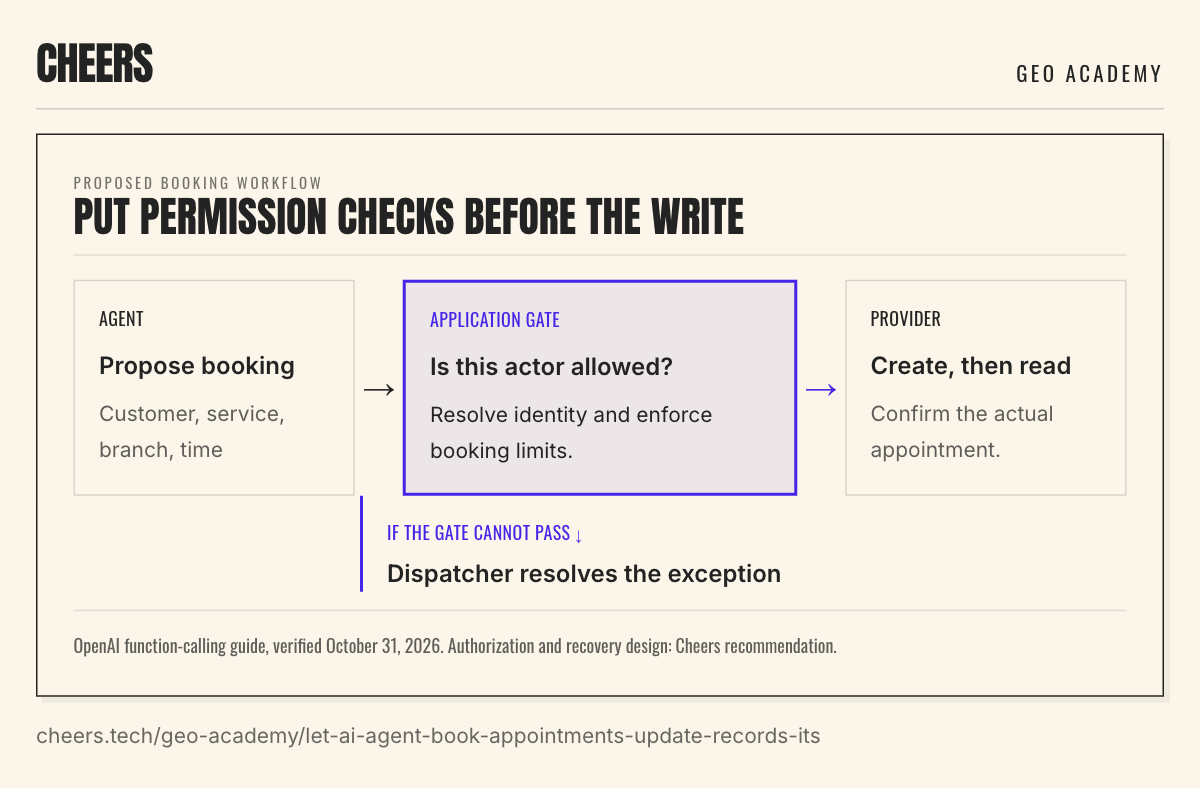
The diagram shows a proposed design, not a claim about a particular vendor's controls. An agent can gather the request, but the application must verify that the authenticated actor is allowed to make that change. Words such as "only book approved services" in a prompt aren't a substitute for that check.
Use the serving branch's booking rules
A calendar gap doesn't establish that a branch can perform the job. The serving system may need to account for travel time, crew qualifications and service duration. Recheck availability just before creating the appointment, and use a provider-supported hold or conflict-safe booking operation when available.
Google Calendar's event-creation guide requires an appropriate OAuth scope and write access to the selected calendar. Those permissions let software create an event. They don't establish that a technician can reach the customer or perform the requested service.
Keep the branch's public promise and internal rules consistent. If the location page says the branch serves a town that dispatch rejects, fix that disagreement. The agent should return the real availability or offer a permitted alternative, rather than force the request into an empty slot.
Walk through a booking that partly succeeds
Consider this fictional auto-service workflow. A customer requests a tire rotation at the North branch on November 3, 2026, at 10:00 a.m. America/Los_Angeles. The application resolves test customer C-104 and stores request R-104 before making a write.
The scheduler creates appointment A-782. A separate read confirms the customer, branch, service and time. The workflow saves that reference and marks the booking confirmed.
Next, the CRM call tries to attach A-782 to C-104, but the connection times out. The system records "booking confirmed; CRM unresolved." A read that shows no appointment reference is not enough to retry: the original write could still be running, or the read could be stale. In this example, the provider confirms that the original attempt ended without saving the change. A current record check then confirms that C-104 lacks A-782.
The workflow now resumes only the CRM step, using a provider-supported idempotent operation tied to the same request reference. That means repeating the request cannot create a second effect. It attaches A-782, checks the completed operation and reads the current record to confirm the reference is present. There is still one appointment. This fictional example assumes the CRM supports those checks and retry protection; the identifiers, date and sequence are not a customer case study.
Fictional request R-104 · North branch
One booking. Resume only after resolution.
1.Book
Scheduler:A-782 created + read
CRM:Not started
2.Attach reference
Scheduler:A-782 remains confirmed
CRM:Write timed out: unknown
3.Resolve attempt
Scheduler:No new booking
CRM:Provider: ended without write
4.Check current record
Scheduler:No new booking
CRM:C-104 lacks A-782
5.Resume CRM only
Scheduler:No new booking
CRM:Idempotent attach + verify
Original write confirmed successful?
Verify the record; skip another write.
Outcome unclear or no safe retry?
Keep unresolved; send to dispatcher.
Cheers illustrative design, October 31, 2026. Assumes provider-confirmed final outcomes, current reads and idempotent writes.
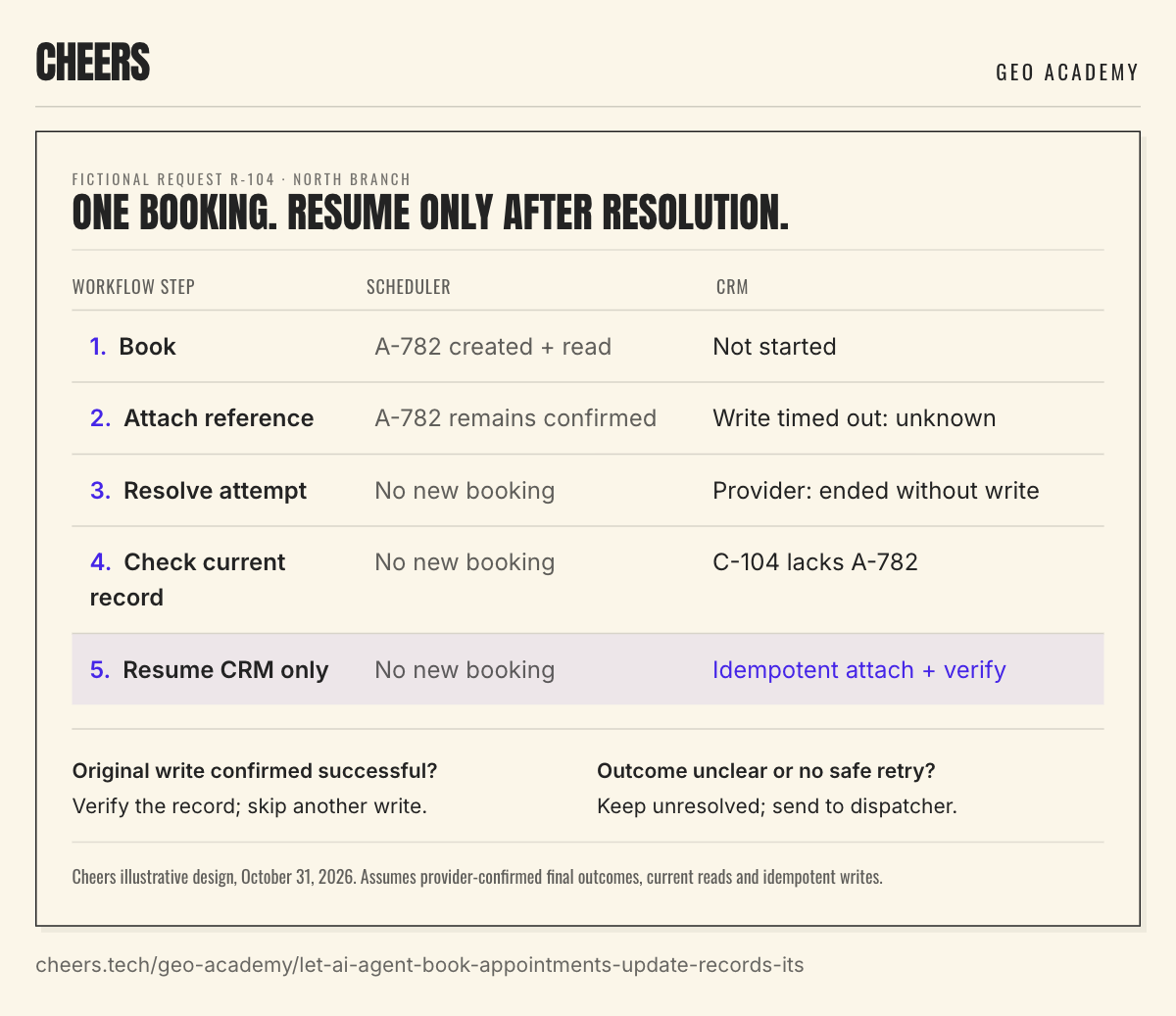
If the provider instead confirms that the original attempt succeeded, check the matching record and mark the step complete without another write. If the attempt is still pending, the record cannot be checked reliably, or the provider offers no safe retry method, keep the CRM step unresolved and send it to the dispatcher. An absent reference alone does not establish a failed write.
Keep enough state to resume safely
Store the original request reference, the intended change, the provider identifiers and the last verified result for each step. That record should survive the process stopping. The next run needs to know that A-782 already exists, not merely that an earlier attempt encountered an error.
Use the provider's duplicate-prevention mechanism when it offers one. Google Calendar, for example, allows a client-generated event ID that follows its format rules; its documentation says this helps prevent duplicate creation when the backend succeeds but the client doesn't observe the result. Don't assume the scheduler or CRM you use has the same feature.
Google's error guide documents a 409 duplicate response when the requested identifier already exists. In a retry, read the existing event and compare it with the intended booking before treating it as success. A matching identifier doesn't excuse the wrong branch or time.
Apply the same care to customer notifications. A confirmed booking may already have triggered an email from the scheduler. Define which system sends the confirmation, and make that action part of the workflow record so recovery doesn't send it twice. Protect any customer-specific confirmation links according to their contents.
Test recovery before expanding
Use a sandbox or controlled test records with no messages sent to real customers. The first pilot should cover a normal booking, a slot taken during the request, an ambiguous customer match and a timeout after a provider accepted a write. Include a delayed write and a stale record read: neither should trigger an unsafe retry. Also stop the process between the scheduler confirmation and CRM update, then check that the next run resumes correctly.
Have the branch owner compare the provider records with the workflow history. A successful pilot should show which requests completed, which stopped for a valid reason and which need repair. Count verified appointments separately from completed CRM updates.
Ask the vendor to demonstrate the partial-success example live in that test environment. The practical acceptance test is simple: after recovery, the intended appointment exists once, the correct customer record points to it, and the customer receives only the confirmation the business intended to send.
Sources
- OpenAI function calling. The application executes code after receiving a model tool call.
- Google Calendar: create events. Calendar permission, client-generated event IDs and event notifications.
- Google Calendar: handle API errors. Duplicate identifiers and error handling.
Sources read October 31, 2026. Authorization boundaries, the worked example and pilot checks are Cheers design recommendations. Confirm transaction and retry guarantees with the actual providers.
Dylan Allen-Arnegård is the CEO & Co-Founder of Cheers, the local search platform for multi-location service businesses.